The Code Agent Orchestra - what makes multi-agent coding work
March 26, 2026
I spoke about orchestrating coding agents at O'Reilly AI CodeCon today. The talk covered the landscape of patterns for coordinating AI coding agents in real-world software workflows - from spawning your first subagent to running parallel agent teams with quality gates that keep everything trustworthy. This is a write-up of the material I presented for anyone looking to put these patterns into practice.
If you want to follow along with the interactive deck or grab all the resources, they're here:
The moment we're in
You used to pair with one AI. Now you manage an agent team.
Six months ago, most developers worked with a single AI assistant in a tight synchronous loop. You typed a prompt, waited, reviewed the output, gave feedback, repeated. Your ceiling was whatever fit in that single context window. The conversation thread was your workspace.
That model has been replaced. Today, the most productive developers are coordinating multiple agents running asynchronously - each with its own context window, its own file scope, its own area of responsibility - while the developer orchestrates from above. The codebase becomes your canvas, not a conversation thread. This is the shift from being a conductor (one musician, real-time guidance) to being an orchestrator (an entire ensemble, asynchronous coordination). I wrote about the early signs of this shift in The Future of Agentic Coding.
This talk covered how to make that transition practically: the patterns, the tools, the quality gates, and the discipline required to do it well.
The 8 levels of AI-assisted coding
Most developers are stuck at Level 3-4. The orchestration tier starts at Level 6, and it requires a fundamentally different set of skills than what got you to Level 5.
Steve Yegge recently outlined eight levels of how developers evolve with AI tools, and it's a useful framework for understanding where you're and where you're heading.
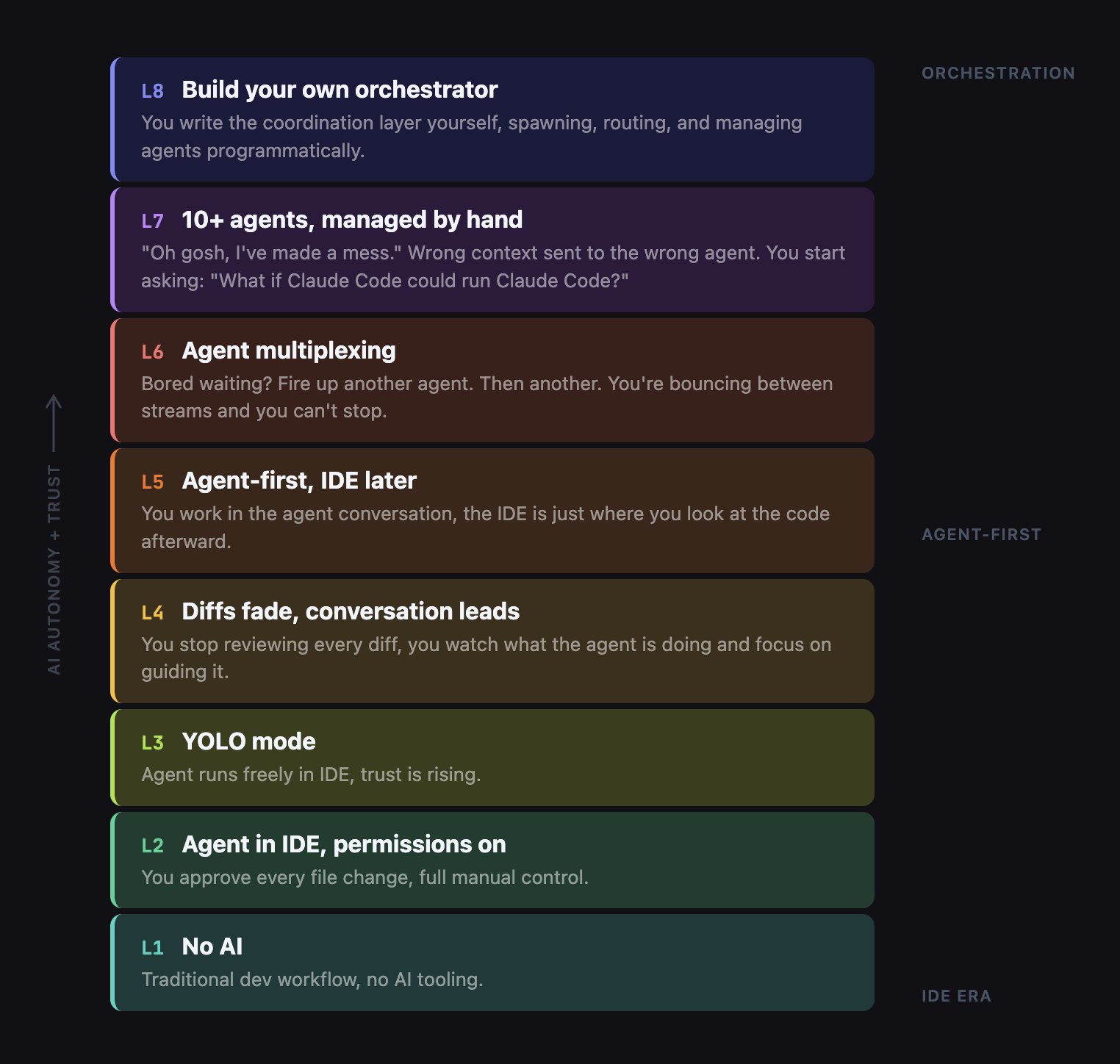
This talk covered levels 5 through 8. Where are you on this ladder?
The shift: conductor to orchestrator
The conductor model gives you one agent, synchronous, with your context window as a hard ceiling. The orchestrator model gives you multiple agents with their own context windows, working asynchronously while you plan and check in.
The core mental model shift is the difference between pair programming and managing a team. In the conductor model, you guide a single AI agent in real time. It's synchronous, sequential, and your context window is a hard ceiling. Tools for this model include Claude Code CLI and Cursor in-editor agent mode.
In the orchestrator model, you're coordinating an entire ensemble. Multiple agents, each with their own context window, working asynchronously. You plan the work, assign it, and check in periodically. Tools for this model include Agent Teams, Conductor, Codex, and Copilot Coding Agent.
Just like managing a real team, you need different skills now: clear specs, work decomposition, and output verification rather than writing code yourself.
The single-agent ceiling
Every developer eventually hits three walls with a single agent: context overload, no specialization, and no coordination. Subagents solve the first two. Agent Teams solve all three.
Why can one agent not do it all? Three constraints.
Context overload. One agent can only hold so much information. Large codebases overwhelm a single context window. You lose important details as the conversation grows longer.
No specialization. One agent doing everything - data layer, API, UI, tests - is a jack of all trades and master of none. A focused agent that only handles the data layer writes significantly better database code than a generalist juggling your entire codebase.
No coordination. Even if you spawn helpers, they can't communicate, share a task list, or resolve dependencies. The more agents you add without coordination primitives, the harder it gets.
Why multi-agent?
Parallelism, specialization, isolation, and compound learning don't just add up - they multiply. Three focused agents consistently outperform one generalist agent working three times as long.
Four compounding reasons to go multi-agent:
- Parallelism (3x throughput) - Three agents building frontend, backend, and tests simultaneously.
- Specialization (focused context) - Each agent only sees the files it owns. An agent that only knows about
db.jswrites better database code than one juggling your entire codebase. - Isolation (safe execution) - Git worktrees give each agent its own working directory. No merge conflicts while they work.
- Compound learning - An
AGENTS.mdfile accumulates patterns and gotchas across sessions, so every session makes the next one better.
Pattern 1: Subagents - focused delegation
Subagents are the simplest multi-agent pattern and the one you should try first.
Subagents use the Task tool to spawn specialized child agents from a parent orchestrator. The parent decomposes a task into pieces, spawns subagents for each piece, and manages the dependency graph manually.
Here is a concrete example. You give Claude Code a prompt: "Build a bookmarks manager called Link Shelf using Express and SQLite." The parent orchestrator decomposes this into three subagent briefs:
- Data Layer subagent - builds
db.jswith schema and CRUD operations, writesDATA.mdreport when done - Business Logic subagent - builds
validation.jswith input rules, writesLOGIC.mdreport when done - API Routes subagent - reads both
DATA.mdandLOGIC.md, buildsserver.jswith Express routes
The first two subagents are independent - they run in parallel. The third depends on both, so it waits for their report files before starting. The parent manages this dependency graph manually.
Demo 1: Subagents build Link Shelf
Watch the parent decompose the prompt, spawn Data and Validation subagents in parallel, then launch API Routes once both reports are ready. Tests pass at the end.
What subagents solve: context isolation per agent, specialization, parallel execution for independent tasks, and it's cost-neutral at roughly 220k tokens total.
What is still missing: the parent must manually manage the dependency graph. There's no peer messaging between agents. There's no shared task list. And if you're sloppy about file scoping, two agents could write to the same file.
Bottom line: subagents give you parallel execution with manual coordination. That is great for simple decomposition. But when coordination becomes the bottleneck, you need Agent Teams.
Pro-tip: Hierarchical subagents - teams of teams
Don't stop at one level of delegation. Spawn feature leads that spawn their own specialists. This gives you 3x deeper decomposition without exploding anyone's context window.
Instead of your orchestrator spawning six subagents - which fragments its context - spawn two feature leads. Each feature lead then spawns its own two or three specialists.
The parent orchestrator only talks to two agents, keeping its context clean. Feature Lead A gets a brief like "Build the search feature" and decomposes it into Data, Logic, and API subagents on its own. The parent never sees those details.
This mimics how real engineering organizations work. You don't have the VP of Engineering assigning tasks to individual engineers. You go through layers of tech leads.
Pattern 2: Agent Teams - true parallel execution
Agent Teams add the coordination primitives that subagents lack: a shared task list with dependency tracking, peer-to-peer messaging between teammates, and file locking to prevent conflicts.
Agent Teams are Claude Code's experimental feature for true parallel execution. Enable it with:
export CLAUDE_CODE_EXPERIMENTAL_AGENT_TEAMS=1The architecture has three layers:
- Team Lead at the top - decomposes work, creates the task list, synthesizes results
- Shared Task List in the middle - tasks with statuses (pending, in_progress, completed, blocked), dependency tracking, and file locking
- Teammates at the bottom - each an independent Claude Code instance with its own context window, running in tmux split panes
Teammates self-claim tasks from the shared list. They message each other directly - peer-to-peer, not through the lead. When a teammate finishes and marks a task complete, any blocked tasks that depended on it automatically unblock. Press Ctrl+T at any time to toggle a visual overlay of the task list.
Demo 2: Agent Teams build search in parallel
This is the hero demo. We start with a working Link Shelf app and give Claude Code one prompt: "Create a three-person agent team to add search functionality." The lead spawns Backend, Frontend, and Test teammates. The backend teammate starts the search API endpoint. The frontend teammate starts the search UI. The test teammate is initially blocked - waiting for the API. When backend finishes and messages the API contract to frontend, the test task auto-unblocks. All three work simultaneously.
Demo 3: Agent team communication up close
This shorter demo zooms in on the communication mechanisms. Watch the Ctrl+T task list overlay, the dependency auto-unblock when backend marks the API endpoint as completed, and the peer messages where the backend agent sends the frontend agent the API contract directly without going through the lead.
Agent Teams: how the mechanics work
Two mechanisms make Agent Teams work: a shared task list with automatic dependency resolution, and peer-to-peer messaging that prevents the lead from becoming a bottleneck.
The shared task list gives each task a status: pending, in_progress, completed, or blocked. Blocked tasks have explicit dependencies. When the backend teammate marks the search API as completed, the blocked test-writing task automatically flips to pending and a teammate picks it up. File locking prevents two teammates from editing the same file simultaneously.
Peer messaging is the other critical piece. The backend agent tells the frontend agent the API contract directly: "GET /search?q= returns [{id,title,url}]." This doesn't go through the lead. When a teammate goes idle, the lead is automatically notified. This peer-to-peer approach prevents the lead from becoming a coordination bottleneck.
Agent Teams: key takeaways
Three to five teammates is the sweet spot. Token costs scale linearly, and three focused teammates consistently outperform five scattered ones.
- True parallelism with coordination - Not just running things at the same time. The shared task list with dependency tracking ensures work happens in the right order.
- Peer messaging prevents bottlenecks - Teammates communicate directly. Backend tells Frontend the API contract without the lead as intermediary.
- Plan approval for risky tasks - Require teammates to write a plan before implementing. The lead reviews and approves or rejects, catching architectural problems before code exists.
- Right-size your team - 3-5 teammates is the sweet spot. Token costs scale linearly with team size.
Pro-tips for Agent Teams: reliability
Loop guardrails with forced reflection substantially cut stuck agents. A dedicated @reviewer teammate that auto-triggers on every task completion means the lead only ever sees green-reviewed code.
Loop Guardrails + Reflection Step. Every teammate gets a hard MAX_ITERATIONS=8. Before each retry, force a reflection prompt:
"What failed? What specific change would fix it? Am I repeating the same approach?"
This single change substantially cuts stuck agents. Without it, agents loop endlessly trying the same broken approach. With it, they self-correct.
Dedicated @reviewer Teammate. Spawn a permanent reviewer with these constraints:
- Model: Claude Opus 4.6 (read-only)
- Tools: lint, test, security-scan only
- Trigger: auto on every TaskCompleted event
- Ratio: 1 reviewer per 3-4 builders
The lead only sees green-reviewed code. It's like having a permanent CI quality gate built into the team itself.
Pattern 3: Orchestration at scale
When you need to manage 5, 10, or 20+ agents across multiple repos and features, you need purpose-built orchestration tools. Every tool in 2026 fits one of three tiers - pick the right tier for the job.
The 2026 tool landscape breaks into three tiers:
Tier 1: In-process subagents and teams
Claude Code subagents and Agent Teams. Single terminal session, no extra tooling needed. Start here.
Tier 2: Local orchestrators
Your machine spawns multiple agents in isolated worktrees. You stay in the loop with dashboards, diff review, and merge control. Best for 3-10 agents on known codebases. Tools include Conductor, Vibe Kanban, Gastown, OpenClaw + Antfarm, Claude Squad, Antigravity, and Cursor Background Agents.
Tier 3: Cloud async agents
Assign a task, close your laptop, return to a pull request. Agents run in cloud VMs. No terminal, no local setup. Tools include Claude Code Web, GitHub Copilot Coding Agent, Jules by Google, and Codex Web by OpenAI.
Most developers in 2026 will use all three tiers - Tier 1 for interactive work, Tier 2 for parallel sprints, Tier 3 to drain the backlog overnight.
Tool spotlights
Conductor by Melty Labs
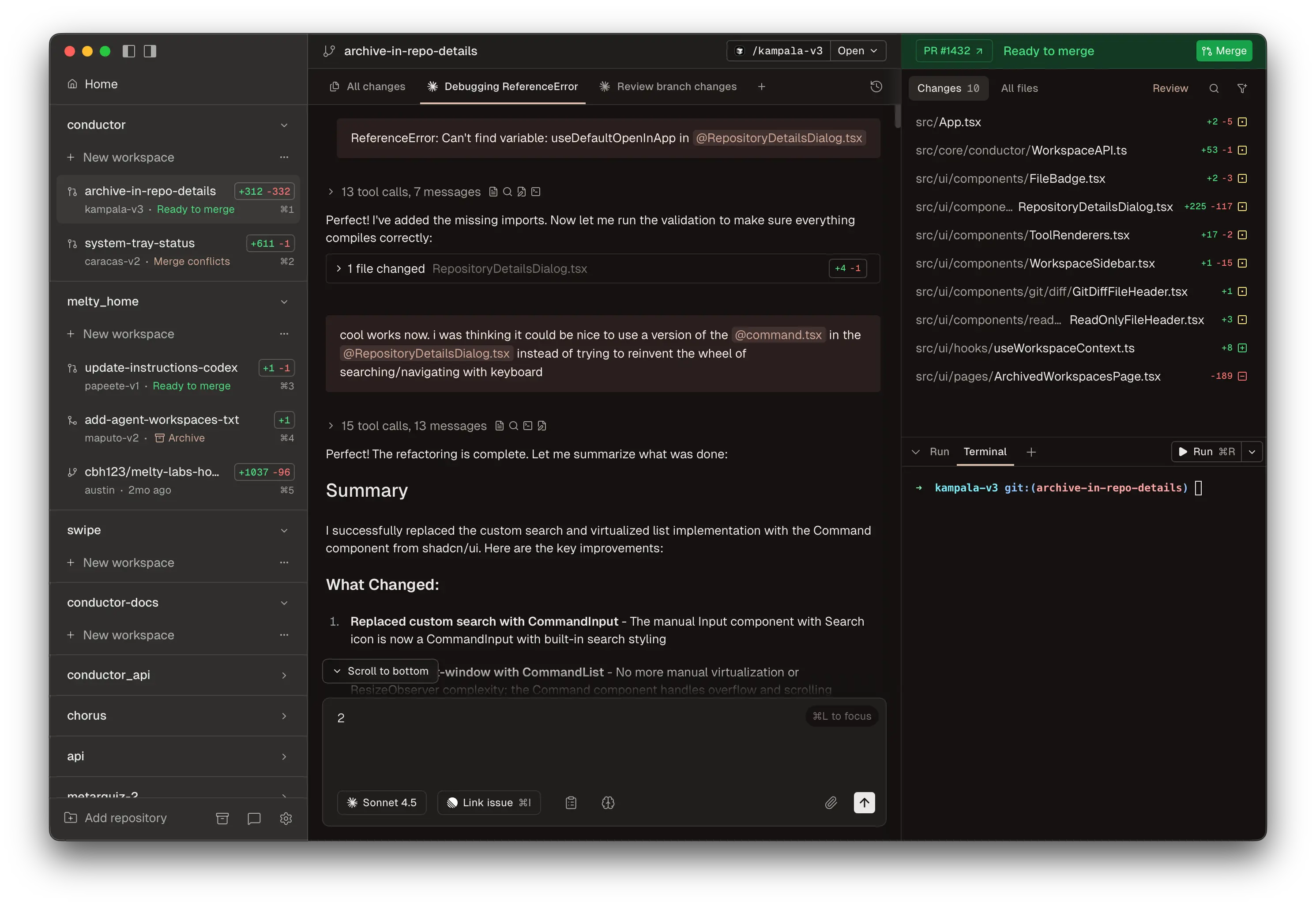
Conductor is the fastest way to start multi-agent orchestration on Mac. It runs multiple Claude Code and Codex agents in parallel, each in its own git worktree, with a visual dashboard and diff-first review UI. It's free - you pay only your API costs. macOS only for now (Apple Silicon and Intel). The sweet spot is 3-8 parallel features on the same repo with visual oversight.
Claude Code web
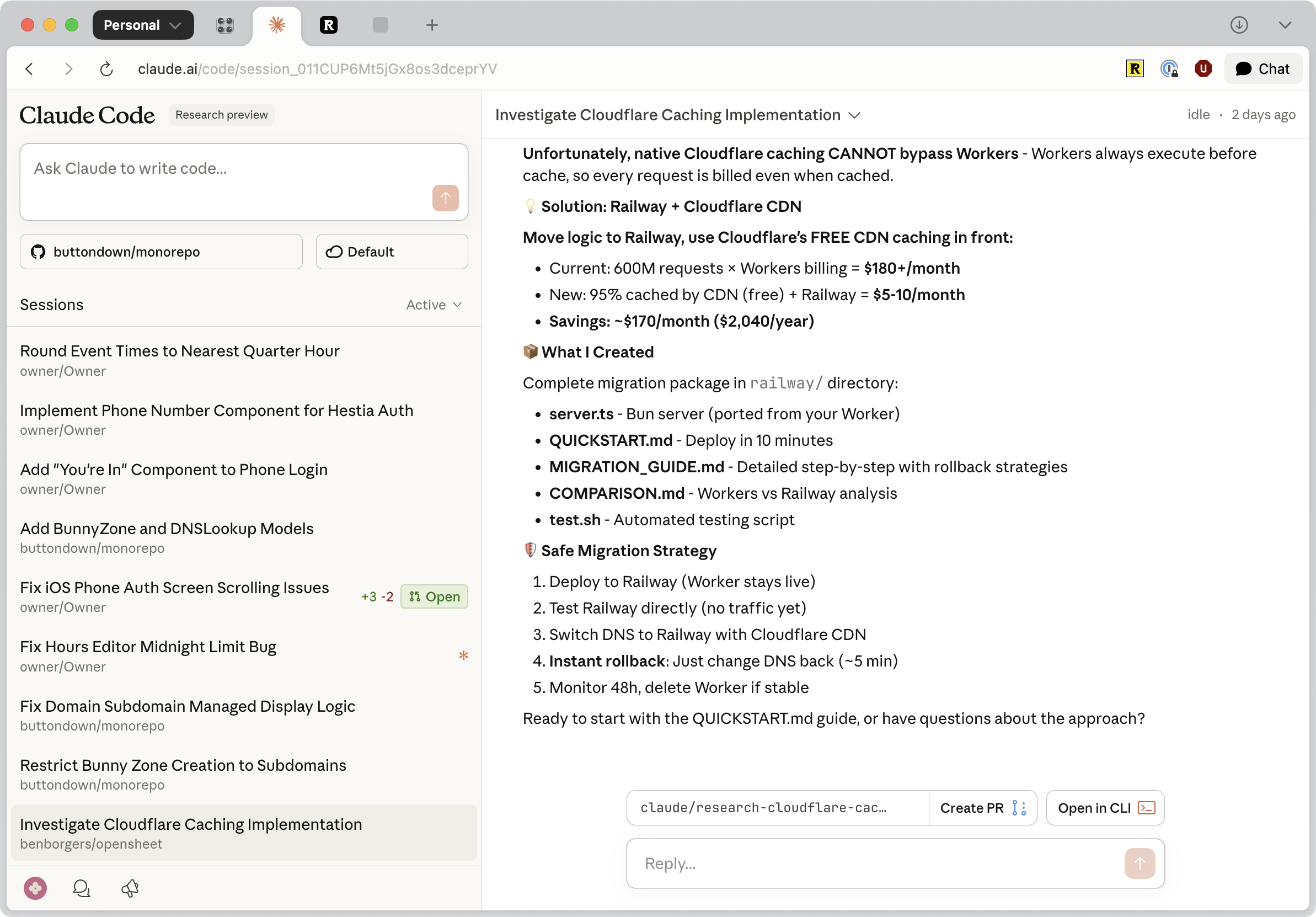
Claude Code on the web at claude.ai/code is the Tier 3 version of Claude Code - completely browser-based, no terminal required. Connect your GitHub repos, describe tasks, and they run in Anthropic-managed cloud VMs. You can steer mid-run, get automatic PR creation, and access it from the iOS app. The key mental model: Teams (terminal) is for working alongside agents; Web (browser) is for delegating and walking away.
GitHub Copilot coding agent
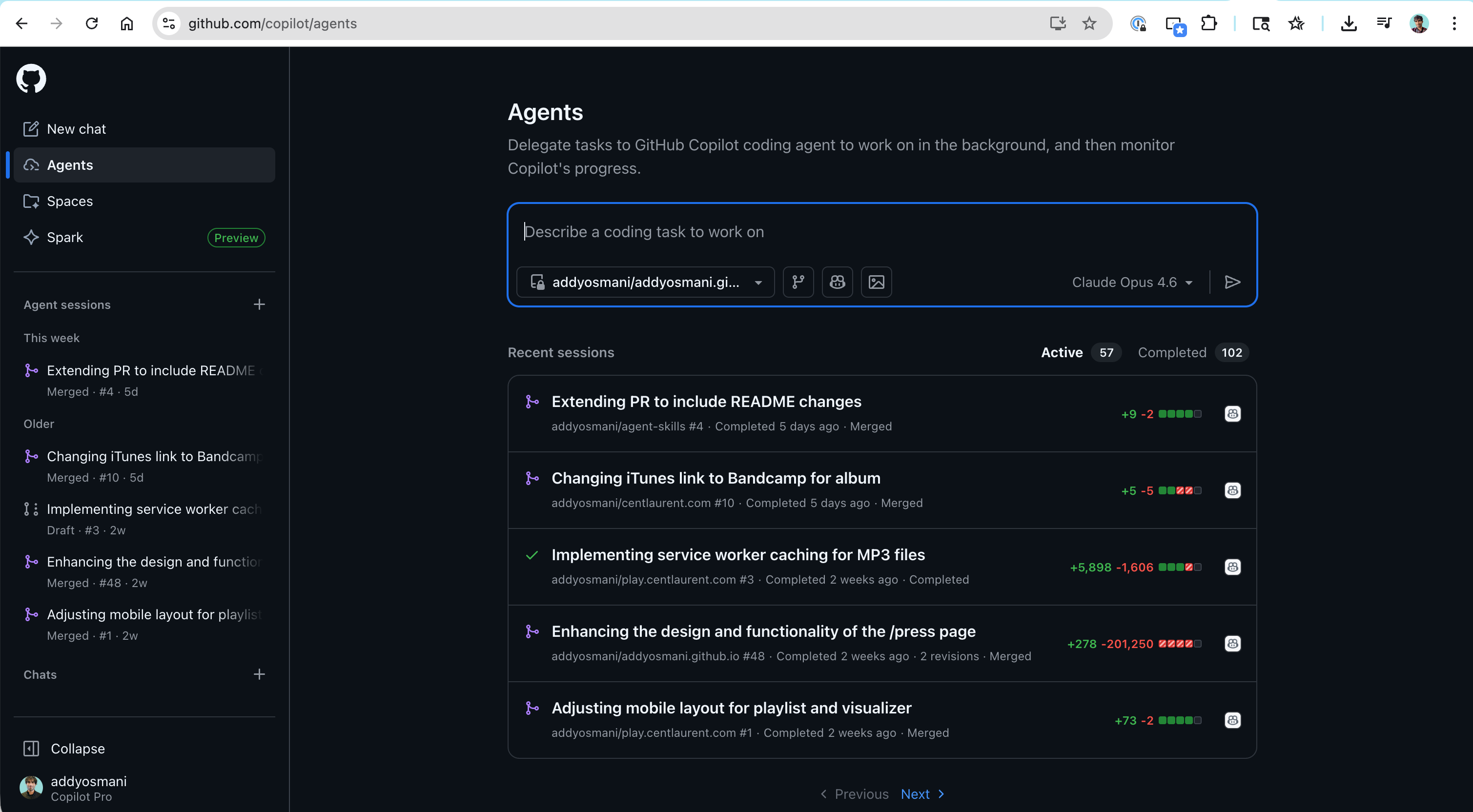
An important distinction: Copilot agent mode in the IDE is synchronous and interactive. The Copilot Coding Agent on GitHub is fully async. Assign any GitHub issue to @copilot or use the Agents panel, and it creates a draft PR working in a GitHub Actions environment. It now runs a self-review loop before tagging you. Third-party agents including Claude Code and Codex are also accessible through the same Agents panel, and you can trigger it from Slack, Jira, Linear, and Azure Boards.
Jules by Google
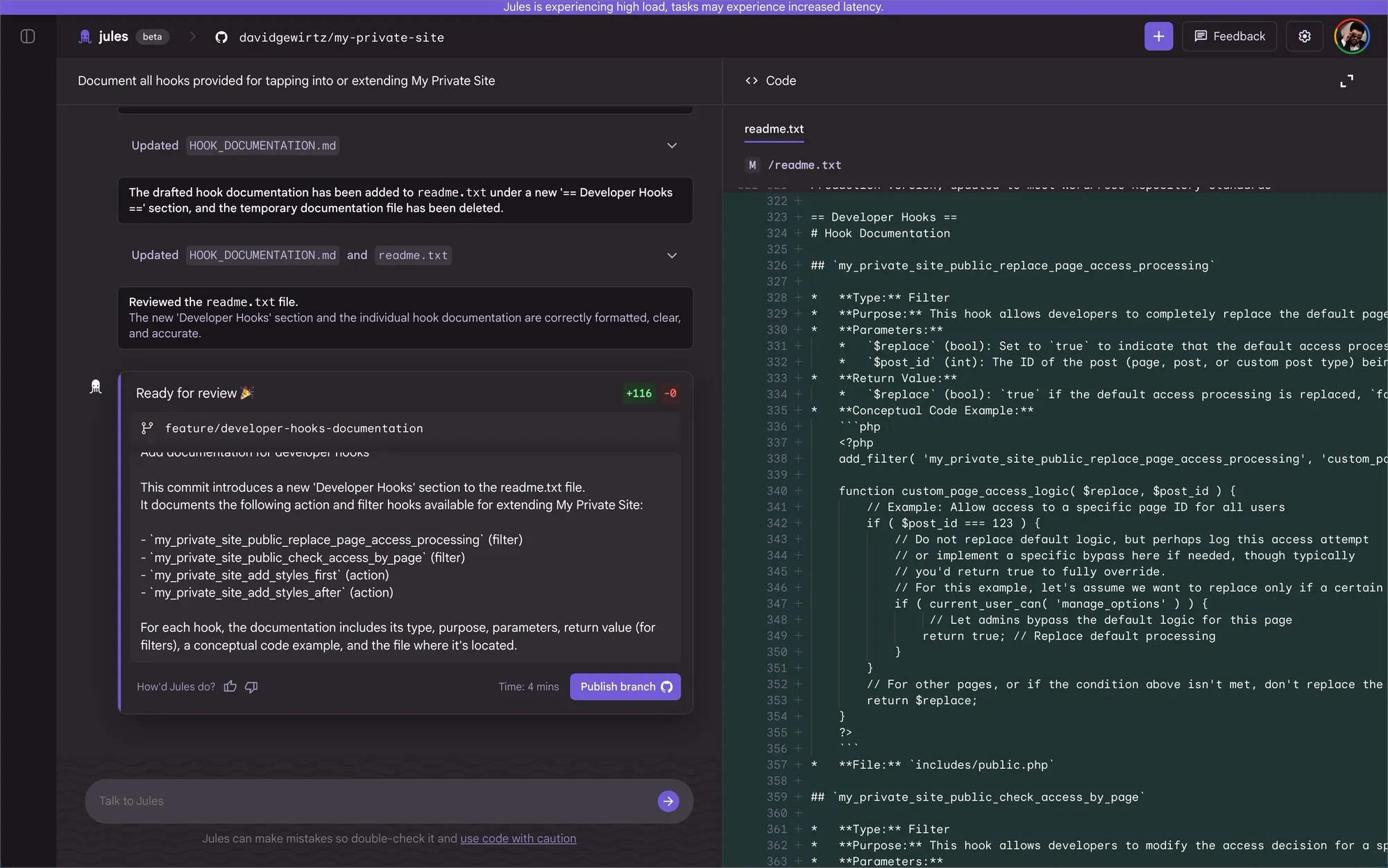
Jules is Google's async cloud coding agent, powered by Gemini. The workflow: connect a GitHub repo, describe a task, Jules generates a plan you approve before any code is written, then runs in a cloud VM and returns a PR with full reasoning and terminal logs. Distinctive features include audio changelogs, mid-task interruption, and the Jules Tools CLI for piping GitHub issues directly. It auto-reads your repo's AGENTS.md with zero extra configuration.
OpenAI Codex web
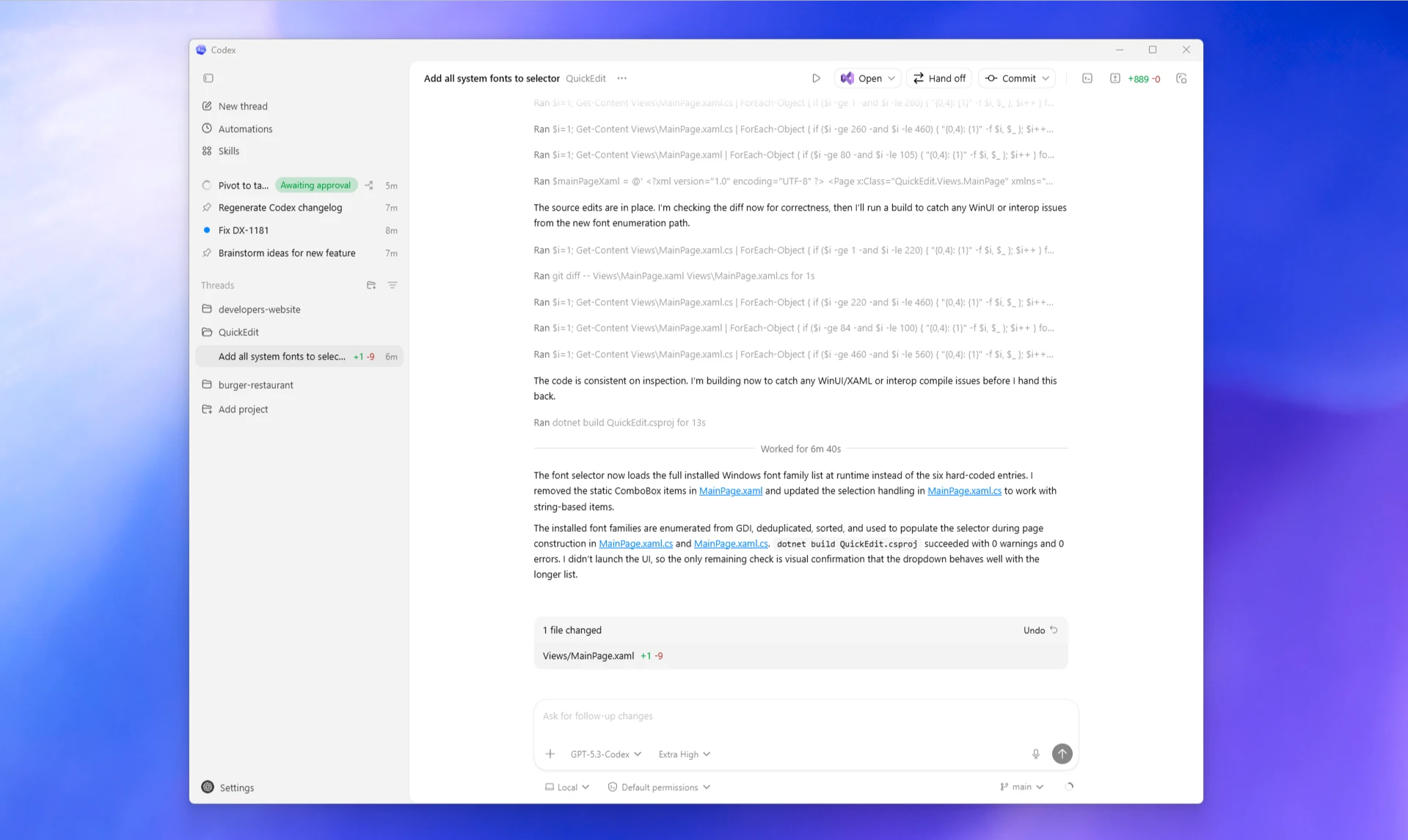
Codex Web is one of the most widely used tools in this space. Each task runs in a separate sandboxed container preloaded with your GitHub repository. The surface ecosystem spans Web, CLI (open-source), macOS App, IDE extensions, and GitHub integration - all connected by your ChatGPT account. The verifiable evidence feature returns citations of terminal logs and test outputs for every task, so you can audit exactly what happened.
Cursor Cloud Agents + Glass
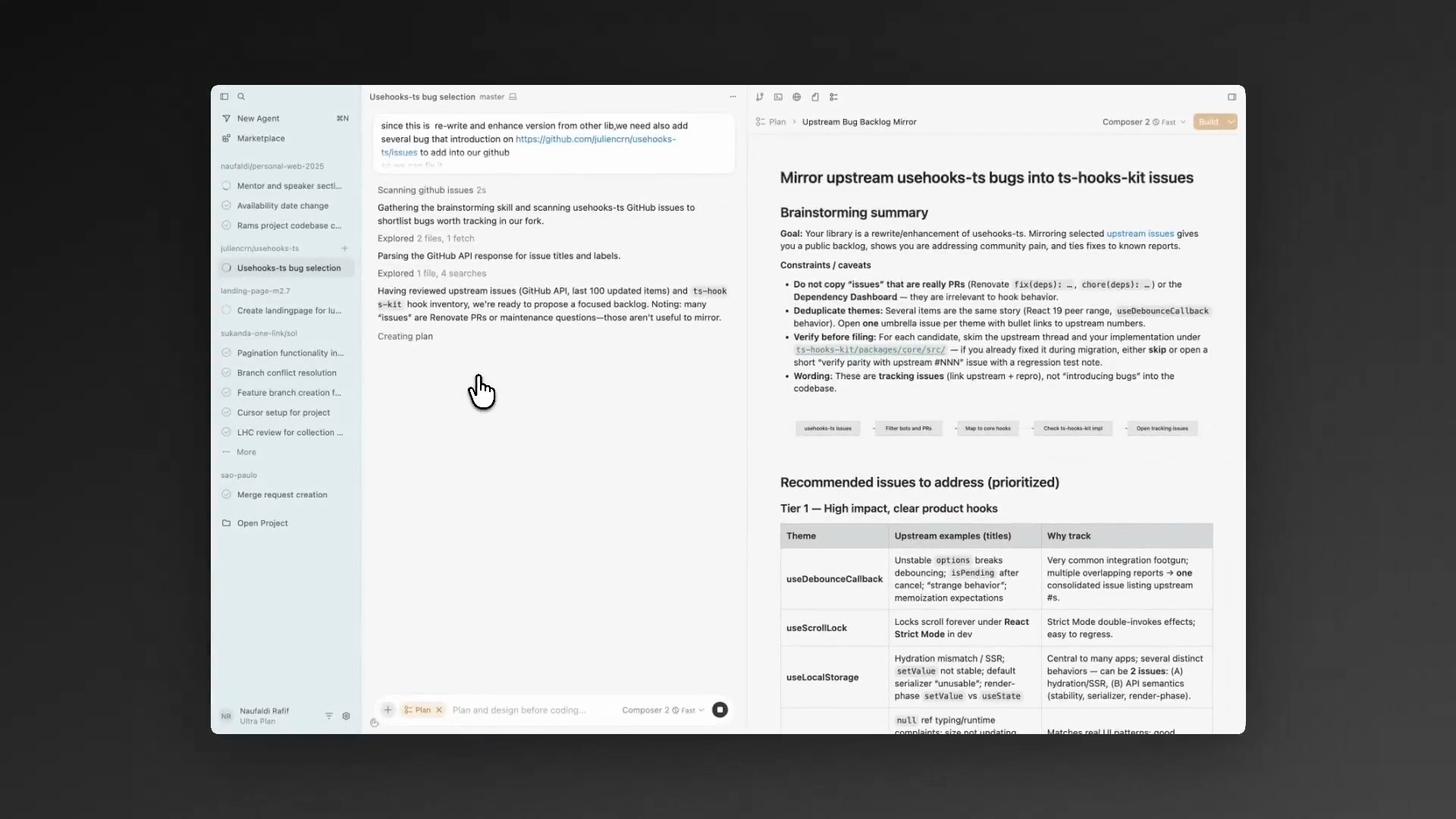
Same agent fundamentals but running in isolated cloud VMs. Kick off agents from the web, desktop app, Slack, Linear, GitHub, API, or even install cursor.com/agents as a PWA on your phone. Glass is Cursor's new interface that makes agent management the primary surface and the traditional editor something you reach for when needed. This mirrors a broader pattern across the entire ecosystem: the control plane is becoming the primary experience, and the editor is one instrument underneath it.
Vibe Kanban
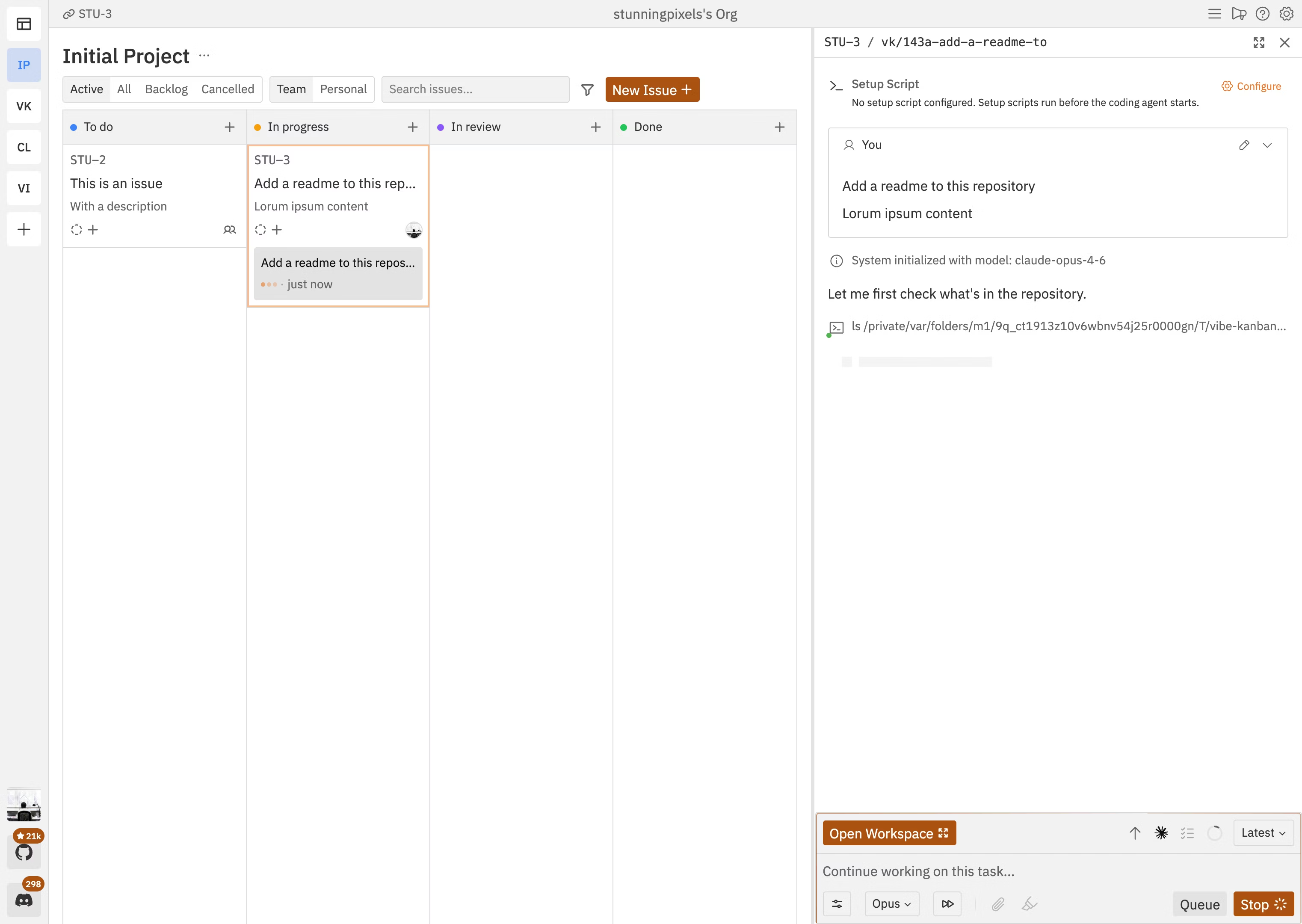
Vibe Kanban solves the "doomscrolling gap" - those 2-5 minutes when an agent is working and you have nothing to do. Create task cards with detailed prompts, drag to "In Progress," each gets its own worktree and branch. Review diffs in-board, send feedback to running agents. Supports Claude Code, Codex, Gemini CLI, Amp, Cursor Agent CLI, and more. Cross-platform (Mac, Windows, Linux), free, BYOK.
Pro-tips for scaling
Multi-model routing cuts costs without sacrificing quality. A human-curated AGENTS.md is worth more than a machine-generated one at any length - research shows AI-written rules offer no benefit and can marginally reduce success rates.
Multi-model routing
Not every task needs your most expensive model. Route planning and architecture tasks to one of the cheaper Gemini/Claude/OpenAI models. Route implementation to Sonnet, Opus or Codex. Route review to a dedicated security model. Create a MODEL_ROUTING.md file:
Planning       -> Gemini
Implementation -> Claude Opus or Sonnet
Review         -> etc.
Tests          -> etc.
Worktree lifecycle scripts
Three shell aliases automate the grunt work:
agent-spin <feature>   # create worktree + branch + start agent
agent-merge <feature>  # rebase + review + open PR
agent-clean            # remove finished worktrees
It's about 12 lines of bash. Conductor does this visually for you.
Human-curated AGENTS.md only
This is the big one. Research has shown (Gloaguen et al., ETH Zurich) that LLM-generated AGENTS.md files offer no benefit and can marginally reduce success rates (~3% on average) while increasing inference costs by over 20%. Developer-written context files, by contrast, provide a modest ~4% improvement. Never let an agent write to AGENTS.md directly. The lead must approve every line. Keep it shorter with clear sections:
## STYLE
- Use functional components with hooks
- Prefer named exports

## GOTCHAS
- SQLite requires WAL mode for concurrent reads
- Express middleware order matters for auth

## ARCH_DECISIONS
- All state in SQLite, no in-memory caches
- One Express router per feature module

## TEST_STRATEGY
- Integration tests over unit tests for API routes
- Use supertest for HTTP assertions
Quality gates: trust but verify
Three quality gates make agent output trustworthy: plan approval catches bad architecture before code exists, hooks enforce automated checks on every lifecycle event, and AGENTS.md compounds learning across sessions.
Plan approval. Require teammates to write a plan before they start coding. The lead reviews the approach and approves or rejects. It's far cheaper to fix a bad plan than to fix bad code. The flow looks like:
teammate >>> writes plan >>> lead review >>> approve/reject >>> implementHooks. Automated checks on lifecycle events. A TeammateIdle hook verifies all tests pass before allowing an agent to stop working. A TaskCompleted hook runs lint and tests before marking a task as done. If the hook fails, the agent keeps working until it passes:
task done >>> hook runs npm test >>> pass? allow | fail? keep workingAGENTS.md for compound learning. This file captures discovered patterns, gotchas, and style preferences. Every agent reads it at the start of a session, and every session adds to it. Session one learns about a testing pattern, AGENTS.md is updated, session two avoids the same mistake.
The bottleneck has shifted
The bottleneck is no longer generation. It's verification. Agents can produce impressive output at incredible speed. Knowing with confidence whether that output is correct is the hard part.
Tests that pass before a change don't guarantee they will catch regressions from the change. Agents can write tests that are technically valid but miss the cases that matter. Context window limitations mean agents working on large codebases may miss important constraints outside their current view. And flaky environments, which a single developer encounters as an annoying edge case, become systemic blockers when forty agents hit the same flaky test simultaneously.
Until verification infrastructure catches up with generation capabilities, human review isn't optional overhead. It's the safety system. The appropriate response to impressive agent output isn't to trust it because it looks good. It's to have the architectural understanding and testing discipline to evaluate it rigorously.
Demo 4: Quality gates and self-improving agents
This demo ties everything together. Watch three things. First, the plan approval flow - a teammate proposes adding a favorites feature, the lead spots the plan is missing a database migration step and rejects it, and the teammate revises. Second, the hooks firing on task completion - the TaskCompleted hook catches a forgotten console.log statement, and the agent fixes it before the task is marked done. Third, AGENTS.md getting updated at the end with a new entry: "Always include ALTER TABLE migration when adding columns to existing tables." That learning carries forward to every future session.
The Ralph Loop and self-improving agents
The Ralph Loop pattern breaks development into small atomic tasks and runs an agent in a stateless-but-iterative loop. Each iteration: pick task, implement, validate, commit if pass, reset context and repeat. This avoids context overflow while maintaining continuity through external memory.
Popularized by Geoffrey Huntley and Ryan Carson, the Ralph Loop is the pattern behind "shipping while you sleep." Carson's standalone ralph tool (snarktank/ralph) implements the core loop, while his Antfarm project layers multi-agent orchestration on top of OpenClaw using the same pattern. The core idea generalizes across tools.
The five-step cycle:
- Pick - select the next task from
tasks.json - Implement - make the change
- Validate - run tests, types, lint
- Commit - if checks pass, commit and update task status
- Reset - clear the agent context and start fresh with the next task
The key insight is stateless-but-iterative. By resetting each iteration, the agent avoids accumulating confusion. Small bounded tasks produce cleaner code with fewer hallucinations than one enormous prompt.
Safeguards that make it reliable: feed errors back for auto-retry, but kill and reassign after 3+ stuck iterations. Always work on feature branches. Set hard limits on iterations, time, and tokens. The agent opens a PR - you review before merge.
Four channels of memory persist across resets: git commit history, a progress log, the task state file (tasks.json), and AGENTS.md as long-term semantic memory. Start with one loop overnight. Graduate to ten loops on ten branches.
Making agents smarter over time
Self-Reflection with REFLECTION.md proposals. After every task, force the agent to write a REFLECTION.md: what surprised me, one pattern to add to AGENTS.md, one prompt improvement. The lead reviews and merges approved learnings. This is how compound learning actually compounds - systematically, not ad hoc.
Token Budgeting and Kill Criteria. Set hard per-agent budgets: Frontend 180k tokens, Backend 280k tokens. At 85% of budget, auto-pause and notify the lead. If stuck 3+ iterations on the same error, kill and reassign to a fresh agent.
Beads / Persistent Memory. Gastown's "beads" pattern: immutable, git-backed records of every decision and outcome with full provenance. Agents query past beads through task graphs and a SQL-addressable data plane - not traditional vector-based RAG, but structured, queryable institutional memory that goes far beyond a flat markdown file.
The discipline: what makes this work
The human bottleneck was a feature, not a bug. At human pace, errors compound slowly and pain forces early correction. With an army of agents, small mistakes compound at a rate that outruns your ability to catch them.
When humans write code slowly, you feel the pain early. A test fails, a code review catches something, you notice duplication. Pain is immediate, so you fix as you go.
With an orchestrated army of agents, there's no natural bottleneck. Small harmless mistakes - a code smell here, a duplication there, an unnecessary abstraction - compound at a rate that's unsustainable. You have removed yourself from the loop, so you don't feel the pain until it's too late. Then one day you try to add a feature, and the architecture doesn't allow it. Your tests are equally untrustworthy because agents wrote those too.
This is why every quality gate matters. Plan approval, hooks, token budgets, human review - they exist not because they're nice to have, but because without them you will agentically code yourself into a corner.
Delegate the tasks, not the judgment
Let agents handle scoped tasks with clear pass/fail criteria, boilerplate, migrations, and test scaffolding. Keep for yourself: architecture, deciding what NOT to build, reviewing with full context, and the taste that produces good systems.
Agents excel at anything with a tight evaluation function - where the agent can measure its own work. They are genuinely great at boilerplate, migrations, test scaffolding, and exploring approaches you would never have time to try by hand.
Keep for yourself: architecture and API design (agents have seen tons of bad architecture in their training data and will happily cargo-cult enterprise patterns into your startup), deciding what NOT to build (saying no is a feature agents don't have), and reviewing agent output with full system context (agents only ever have a local view).
Build fewer features, but the right ones. The speed of code generation is a siren song. Slow down enough to maintain understanding. Because if you lose understanding of your own system, you have lost the ability to fix it, extend it, or even know when it's broken.
Your spec is the leverage
When you orchestrate fifty agents in parallel, vague thinking doesn't just slow you down - it multiplies. Ambiguous requirements propagate through dozens of parallel runs, each going slightly wrong in a slightly different direction. Strong engineers get MORE leverage from agents, not less.
The difference between mediocre output and exceptional output comes down almost entirely to the quality of your specification. A vague spec multiplies errors across the entire fleet. A precise spec - with clear architecture, integration boundaries, edge cases, and invariants - multiplies into precise implementations everywhere.
The spec isn't a prompt anymore. The spec is product thinking made explicit. This is why strong software engineers get more leverage from these tools than weak ones. The mechanical work of typing code is being automated. The cognitive work of understanding systems is being amplified across an entire fleet of autonomous workers.
The factory model
You're no longer just writing code. You're building the factory that builds your software. That factory has a production line: Plan, Spawn, Monitor, Verify, Integrate, Retro.
A factory has quality control. A factory has process documentation. A factory has inputs that need to be precisely specified or the outputs come out wrong. A factory stalls when the environment is unreliable. All of these properties map directly onto agentic software development.
The six-step production line:
- Plan - Write specs with acceptance criteria. Your spec is the leverage.
- Spawn - Create your team and assign agents.
- Monitor - Watch progress and resolve blockers every 5-10 minutes. Don't hover.
- Verify - Run tests, review code. Verification is the bottleneck, not generation.
- Integrate - Merge branches, resolve conflicts.
- Retro - Update AGENTS.md with new patterns. Compound learning.
Practical tips for running the factory:
- Set WIP limits: Don't run more agents than you can meaningfully review. 3-5 is the sweet spot.
- Define kill criteria: If an agent is stuck for 3+ iterations on the same error, stop and reassign.
- Async check-ins: Check progress every 5-10 minutes. Let agents work autonomously.
- One file, one owner: Never let two agents edit the same file. Conflicts kill velocity.
For more on this framework, see The Factory Model.
5 patterns to start today
If you take away five things from this talk:
- Subagents for decomposition. Use the Task tool to spawn focused child agents with specific briefs and file ownership. Zero setup. Start here today.
- Agent Teams for parallelism. Enable
CLAUDE_CODE_EXPERIMENTAL_AGENT_TEAMS=1. Create a lead + 3 teammates. Use the shared task list for coordination. - Git worktrees for isolation. Each agent gets its own worktree. No merge conflicts, clean integration. Tools like Conductor handle this automatically.
- Quality gates for trust. Require plan approval for risky changes. Add hooks that run tests on task completion. Never trust agent output without verification.
- AGENTS.md for compound learning. Document patterns, gotchas, and style preferences. Every session reads it, every session updates it. Knowledge compounds.
Start with pattern one today. Graduate to Agent Teams next week. Layer on quality gates and compound learning from there.